
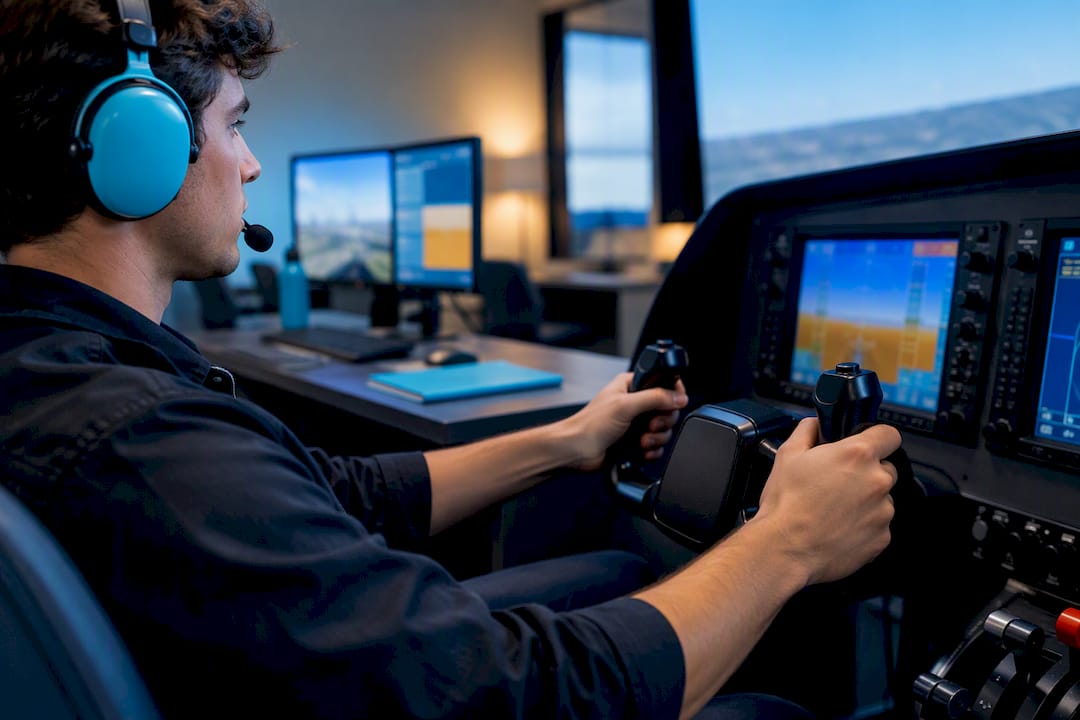
Glass cockpit training is the structured process of learning to operate integrated digital flight displays like the Garmin G1000 through a deliberate sequence of desktop practice, approved simulator sessions, and instructor-led flights. Done correctly, it builds procedural fluency, sharpens instrument proficiency, and prepares you for the flight decks used across nearly every modern training and airline fleet. Time in an FAA-approved training device can count toward your certificate, provided the device and instructor meet specific regulatory conditions.
TL;DR:
- Using FAA-approved advanced simulators can credit hours toward certification, but only if they hold a current Letter of Authorization matching the training purpose.
- Building from desktop trainers to full IFR scenario flights in an AATD enhances procedural fluency and systems familiarity before in-air practice.
- Regular hand-flying segments and partial-panel drills are essential to maintain raw stick-and-rudder skills and prevent overdependence on automation.
- Training must include specific failure simulations and mode awareness exercises to prepare for real-world reversionary and degraded-system scenarios.
- Current Garmin software and databases require ongoing updates and verification to ensure training reflects the latest procedures and avoids invalid hours.
Every glass flight deck splits its information across two primary displays. The Primary Flight Display (PFD) shows attitude, airspeed, altitude, and heading in one consolidated field of view. The Multi-Function Display (MFD) handles navigation, engine data, weather, and traffic. Garmin’s G1000, and its updated G1000 NXi variant, dominates the training fleet and appears in aircraft from Cessna to Cirrus, which makes it the closest thing general aviation has to a universal standard.
Your training device options fall into a clear hierarchy, each suited to a different stage of learning:
Before you book time in any device, confirm it holds a valid Letter of Authorization under AC 61-136A, since only properly approved devices generate loggable credit.
Glass displays give you a moving map, integrated terrain awareness, and a synthesized view of engine and navigation data that a six-pack panel simply cannot match. Approaches feel more organized because course deviation, vertical guidance, and traffic often sit on a single screen instead of scattered across separate gauges. Since most training and airline aircraft now use some form of digital flight deck, learning it early builds skills you will use for your entire career.
The tradeoff is real. Heavy reliance on automation can dull raw stick-and-rudder skill, and new students sometimes fixate on the display instead of scanning outside or cross-checking instruments, a habit instructors call tunnel vision.
AOPA’s reporting on the analog versus digital training debate makes a strong case that pilots trained on both instrument types end up more well-rounded. Analog builds scan discipline; glass demands systems and mode-awareness skills. Neither replaces the other.
Pro Tip: Cover the PFD with a checklist card for five minutes during a desktop trainer session and fly by cross-referencing the MFD and standby instruments alone. It is uncomfortable at first, and that discomfort is exactly the point.
Garmin’s own procedural guidance recommends learning avionics on the ground before spending money in the air, and that sequencing is the backbone of an efficient glass cockpit training plan.
Save flight-plan entry, knob flows, and autopilot logic for the desktop trainer. Reserve the AATD for high-workload IFR scenarios and failure management. Keep the actual aircraft for takeoffs, landings, and the physical feel no simulator fully replicates. Early FITS and SAFER research suggests scenario-based glass syllabi can reduce total training hours for some students, though the evidence remains preliminary and should not be treated as a guarantee.
Pro Tip: Log your desktop trainer sessions in a personal notebook, not your official logbook. It is not FAA-creditable time, but tracking it keeps you honest about how much ground-based repetition you have actually done.

AC 61-136A sets the legal framework for how device time counts. It defines three categories: Aviation Training Devices (ATD), Basic Aviation Training Devices (BATD), and Advanced Aviation Training Devices (AATD), each with its own design criteria and approved uses under Parts 61 and 141.
A device’s approval alone is not enough. Every ATD operates under a Letter of Authorization tied to a specific Qualification and Approval Guidance (QAG) document. That QAG spells out exactly which credits apply, such as a capped number of instrument training hours, and which do not. A sample AATD LOA from Precision Flight Controls shows this pattern clearly: certain instrument hours are permitted, but no portion of an actual practical test may occur in the device.
Before booking any session, confirm three things:
Skipping this check is how students discover, right before a checkride, that hours they assumed were valid never counted.
Realistic failure practice separates a checkride-ready pilot from one who has only ever seen a fully functioning panel. Common scenarios worth rehearsing include a dimmed display simulating an electrical issue, a forced reversionary mode where one screen takes over both PFD and MFD functions, and AHRS or air data computer anomalies that hand you degraded attitude information.
The FAA’s DPE and CFI Guide for the G1000 NXi recommends instructor-controlled dimming or software-based failure injection over pulling circuit breakers repeatedly, since repeated CB cycling can degrade the breakers themselves.
Examiners expect you to hand-fly an approach on standby instruments, switch CDI source manually, and stay ahead of the airplane without the automation you have leaned on for months. That expectation does not change whether the failure hits during a private, instrument, or commercial checkride.
Every glass cockpit, regardless of manufacturer, organizes information around a handful of core functions you need to master before anything else feels intuitive.
The PFD anchors your attention with attitude indication at the center, airspeed on the left tape, altitude on the right tape, and a heading indicator below. Around that core sit smaller data fields for vertical speed, turn rate, and autopilot mode annunciations. Learning to read those annunciations matters more than most new students expect, since a misread autopilot mode is one of the most common sources of confusion in early glass cockpit usage.
The MFD centers on the moving map, but its real power comes from secondary pages: engine monitoring, weather overlays, terrain awareness, and traffic displays. Flipping between these pages efficiently, without losing your primary scan, is a skill that only comes from repetition.
Autopilot coupling deserves separate attention. Understanding how the flight director communicates with the autopilot, and how to verify the airplane is actually following the mode you selected, prevents one of the most common in-flight surprises: the autopilot doing something other than what you intended.
Finally, learn your softkeys and menu structure cold. Every G1000-family unit uses a layered menu system, and knowing which button sequence gets you to frequency entry or flight plan editing without hunting saves critical seconds during high-workload phases of flight.
Transitioning from a six-pack panel to a glass display changes where your mental effort goes, not how much effort flying requires overall. Analog flying demands constant instrument scanning across six separate gauges, building strong manual cross-check habits but leaving less mental bandwidth for navigation and system management.
Glass cockpits consolidate that scan into fewer visual points, which initially feels like a relief. The workload does not disappear. It shifts toward mode awareness, page management, and understanding what the automation is doing at any given moment. A pilot who has only trained on analog instruments often struggles at first with the sheer amount of selectable information on an MFD. A pilot who has only trained on glass sometimes struggles when handed a six-pack panel with no moving map to lean on.
Situational awareness improves in one sense with glass, since terrain, traffic, and weather sit in your peripheral vision continuously. It can decline in another sense if you stop looking outside because the screen feels complete. The strongest students treat the glass display as an aid to situational awareness, not a replacement for it, and they practice cross-checking GPS-derived position against raw navigation sources like VOR or DME regularly.
This is precisely why cockpit decision-making and workload management deserve as much attention in your training plan as button-pushing proficiency does.
Most glass cockpit training struggles trace back to a handful of repeatable errors. Recognizing them early saves aircraft rental money and frustration.
Overreliance on autopilot tops the list. Students who let the autopilot fly every leg of every lesson arrive at their checkride unable to hand-fly a coupled approach when asked. Fix it by mandating hand-flown segments on every single flight, no exceptions.
Menu paralysis happens when a student has not built muscle memory for basic tasks like entering a new frequency or building a flight plan, so precious aircraft time gets burned fumbling through softkey pages. The fix is the desktop trainer routine covered earlier: repetition on the ground until the sequence is automatic.
Confusing automation modes causes pilots to assume the autopilot is doing something it is not, often because a mode annunciation changed without the pilot noticing. Regular verbal callouts of active modes during training flights build the habit of checking, not assuming.
Neglecting standby instruments leaves students unprepared for reversionary-mode scenarios. If your syllabus never requires flying an approach on standby instruments alone, that gap will surface at the worst possible time.
Treating the simulator as a video game rather than a serious training tool undercuts the entire benefit of device time. Brief every simulator session with a specific objective and debrief it the same way you would a real flight.
Logging approved hours in an ATD is only part of what regulators expect from a glass-cockpit-proficient pilot. The FAA’s Airman Certification Standards require demonstrated proficiency with the specific avionics installed in your checkride aircraft, not just familiarity with the concept of a glass panel in general.
That means an examiner can reasonably expect you to program a full flight plan, execute a coupled approach, and recover from a simulated system failure using the specific equipment configuration you trained on. A LOA covering your AATD credits does not certify you personally. It certifies the device and the hours you are permitted to log in it.
Certificated flight instructors bear real responsibility here too. An instructor endorsing your logbook for device time must hold the qualifications specified in that device’s LOA, and the device configuration must match its approved QAG exactly at the time of the session. If a school upgrades software or changes hardware without updating its LOA paperwork, credited hours can become invalid until the paperwork catches up.
Beyond FAA minimums, insurance underwriters and some employers increasingly expect documented glass cockpit experience as a baseline hiring qualification, separate from any device-logging technicality. Building a genuine record of proficiency, not just hours on paper, protects you on both fronts.
Scenario-based training is where isolated button-pushing skill turns into usable judgment. Instead of practicing an ILS approach in a vacuum, a well-designed lesson embeds that approach inside a realistic cross-country flight with a weather diversion, a partial panel failure at the worst possible moment, and a radio frequency change you did not expect.
This integration matters because real flying rarely presents problems one at a time. A student who has only drilled isolated procedures in an AATD can freeze when two things go wrong simultaneously, which is exactly how checkrides and real emergencies tend to unfold.
Building this into your training means asking your instructor to structure cross-country and instrument lessons around a plausible scenario rather than a checklist of maneuvers. A diversion for weather that also requires reprogramming the flight plan and briefing a new approach teaches decision-making under the same cognitive load you will face flying professionally. Reviewing how simulators function inside a structured airline pilot school shows how this scenario-based approach scales up through commercial and ATP-level training, where multi-crew coordination and dispatch decisions add further layers of complexity.
Avionics software does not stay static, and treating it as a set-it-and-forget-it system creates real training gaps. Garmin and other manufacturers release periodic database and software updates that can change menu layouts, add features, or alter default behaviors on units like the G1000 NXi.
Flight schools bear responsibility for keeping navigation databases current, since an expired database can restrict certain approach types or display outdated procedure information entirely. As a student, confirm with your school or instructor that the aircraft or device you are training in has a current database before every significant lesson, particularly ahead of a checkride.
Display care matters more than most students realize. OEM guidance warns that standard household cleaners, particularly ammonia-based products, can permanently damage the anti-reflective coating on avionics displays. Only approved, lint-free cleaning methods should ever touch a glass panel screen, whether in the aircraft or a training device.

Desktop trainer software needs its own upkeep too. If you are practicing on a manufacturer PC trainer or a simulator add-on, check for version updates periodically, since older versions can drift out of sync with the current aircraft interface and teach you habits that no longer match what you will see in the airplane.
Mastering glass avionics is career-smart. Airlines and modern training fleets run on digital flight decks, and fluency there signals readiness. But systems knowledge cannot substitute for genuine hand-flying skill, and a student who treats the autopilot as a crutch will struggle the moment it fails.
A focused simulator program, built around one procedure per session and paired with targeted in-air lessons, can meaningfully cut both training hours and cost. The savings come from discipline, not shortcuts. Prioritize procedural fluency, failure handling, and examiner-style scenario drills over comfortable repetition, and the aircraft time you do pay for will count for far more.
— Rainer
Reading about the progression from desktop trainer to AATD to in-air lesson is one thing. Executing it without losing weeks to checkride scheduling backlogs is another problem entirely, and it’s one most flight schools cannot solve because they depend on outside FAA examiners.

Some flight schools hold Self Examining Authority, allowing checkrides to occur in-house instead of waiting on an external examiner’s calendar. That structural advantage matters directly for glass cockpit training, since a structured progression only pays off if you can move from device time to in-air proficiency to your practical test without long gaps that erode the muscle memory you just built.
If you’re weighing a structured path that folds glass cockpit proficiency into a complete career program, the U.S. Airline Pilot Career Program and the Fixed-Price Airline Flight School Program both build device time and instructor-led scenario flying into the training sequence from day one. Contact admissions to request more detail on how glass cockpit training fits into your specific certificate path.
A handful of sources cover nearly everything you will need as you move through glass cockpit training, and knowing which one to check depends on what question you are trying to answer.
Check the regulatory sources first if you are planning how hours will count. Check the procedural guidance first if you are trying to get faster on the actual buttons.
The main drawbacks are automation complacency, where pilots lean on the autopilot instead of maintaining hand-flying skill, and display tunnel vision, where attention narrows onto the screen instead of an outside scan. Both are manageable through disciplined hand-flying segments and regular partial-panel practice built into every lesson.
Costs vary widely depending on whether you use free desktop trainers, hourly BATD or AATD rental, or full aircraft time, and most flight schools do not publish a single line-item price for “glass cockpit training” since it’s woven into broader certificate courses. Flight School USA’s Fixed-Price Airline Flight School Program runs 85900 USD as a one-off cost covering the full training progression, while current pricing for individual courses like Private Pilot or Instrument Rating training is available directly through admissions.
No age is disqualifying for starting flight training, and plenty of students begin commercial training programs in later adulthood with strong outcomes. Physical fitness for a medical certificate matters more than age itself, and glass cockpit proficiency is learned the same way regardless of when you start.
Yes, the Garmin G1000 is one of the most widely used glass cockpit systems in general aviation and flight training, combining a Primary Flight Display and Multi-Function Display into an integrated digital flight deck. Its updated version, the G1000 NXi, adds features like expanded map data and faster processing while keeping the same core layout most students train on.
You can practice on non-approved consumer simulators like X-Plane or Microsoft Flight Simulator for procedural repetition, but only devices with a valid Letter of Authorization under AC 61-136A generate hours you can log toward a certificate. Always confirm a device’s approval status and matching QAG configuration before assuming any session counts toward your training requirements.


